Who is this article for?
Each request on your waitlist has a priority: 1 is the highest. If you have turned on the option that alerts your clients when a new opening is detected, the alerts are sent in order of priority. You may therefore want to move some requests up or down, for example to favour an urgent situation or a client who has been waiting for a long time.
By default, a new waitlist request gets a lower priority than the existing requests: it is added at the bottom of the list.
Before you start: the waitlist must be turned on (see How to activate the waitlist). To change the order of the requests, you need full access to appointments and access to the data of the other practitioners.
1Open your waitlist
- Go to the waitlist page: www.colib.io/waitlist. You can also click Waitlist on the left of your scheduler.
- The active requests are listed from the highest priority to the lowest. The Priority column shows the position of each request.
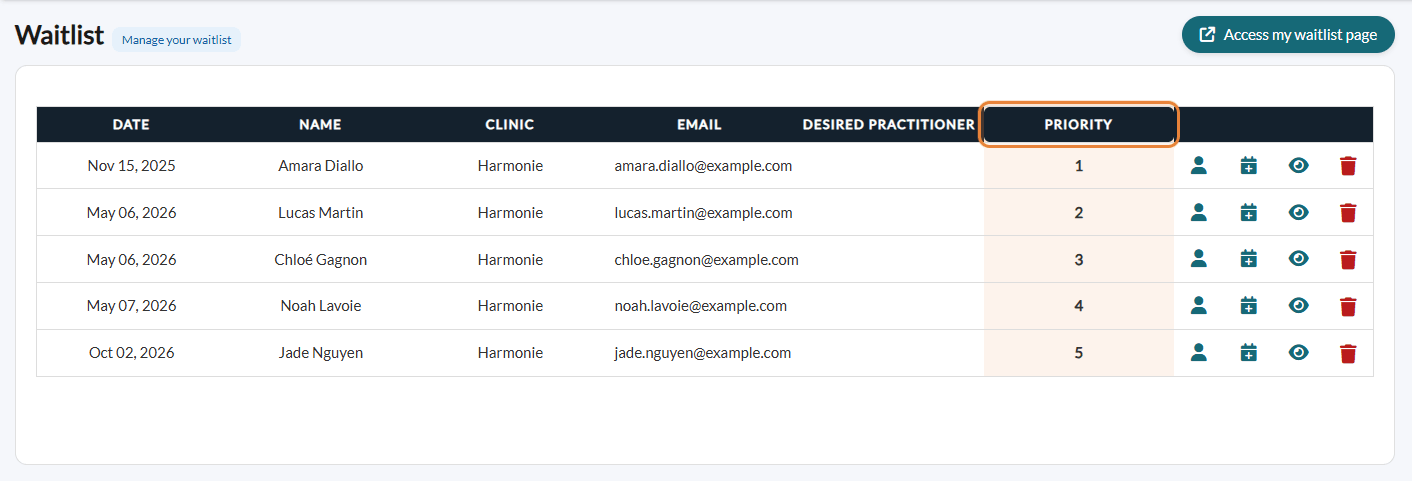
2Drag and drop a request
- Click the row of the request whose priority you want to change and hold the mouse button down.
- Drag the row to the desired position (higher in the list = higher priority).
- Release the mouse button: the new priority is applied immediately and the numbers of the Priority column are updated. There is nothing to save.
How is the priority used?
When a time becomes free (for example after a cancellation), Colib goes through the requests from priority 1 down and alerts the clients whose preferences match the free time (days and times, type of appointment, practitioner). It stops when the number set in How many clients from your waitlist should be notified? is reached. A client higher in the list is therefore alerted first. See How to automatically notify clients of new openings that match their preferences.
Good to know
- When a request leaves the list — deleted by your team, cancelled by the client, or removed automatically because an appointment was booked for the client — the requests below it move up one place.
- Practices with several clinics — drag and drop is not available in accounts with multi-clinic management: the requests stay in the order in which they were received.
- Without the automatic alerts — the priority is still useful to decide which client to call first when a time becomes free.
Still have a question?
Write to us at support@colib.io, we will be happy to help.
Was this article helpful?
That’s Great!
Thank you for your feedback
Sorry! We couldn't be helpful
Thank you for your feedback
Feedback sent
We appreciate your effort and will try to fix the article