Who is this article for?
Want to know what tomorrow looks like before you leave the office? Colib can email each practitioner of your practice, every evening, the list of their appointments for the next day.
This article explains how to turn on this daily summary, what the email contains and who receives it.
Before you start: the daily summary is turned on for the whole practice in Settings > Scheduler (www.colib.io/settings?show=scheduler). You need access to the practice settings to change it.
1Turn on the daily summary
- Go to www.colib.io/settings?show=scheduler. You can also click the Settings icon (gear) in the top bar, then Scheduler in the Admin menu on the left.
- In the Practitioner notifications section, turn on Send daily email summary to practitioners.
- The change is saved as soon as you click the switch: a message confirms that your modifications have been saved.
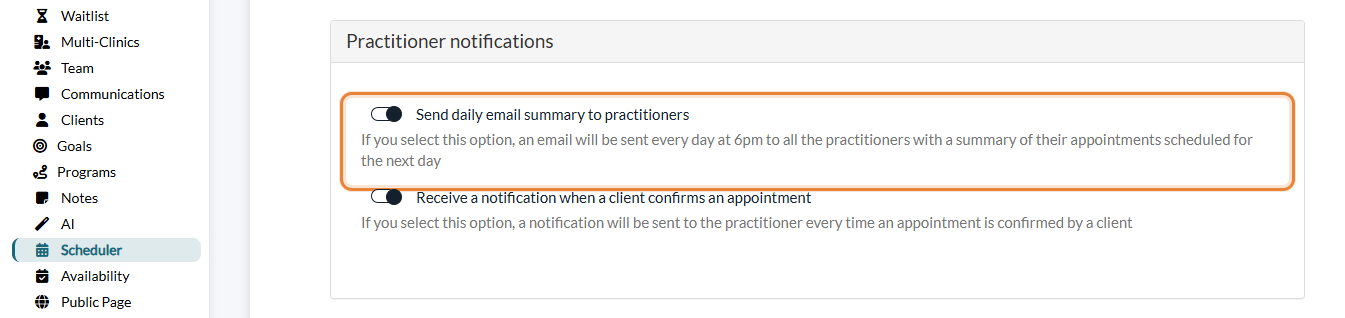
To stop the emails, turn the same switch off.
2What you receive
Every day at 6 p.m., each practitioner who has at least one appointment the next day receives an email titled [name of your practice] - X appointment(s) scheduled tomorrow. It lists their appointments in chronological order. For each appointment, it shows:
- the initials of the client or clients (never their full name);
- the appointment type and the location;
- the start and end time, in the practitioner's time zone;
- an Open button that opens the appointment in your scheduler.
A Scheduler button at the bottom of the email opens your full schedule. You are asked to sign in to Colib if you are not signed in already.
| Question | Answer |
|---|---|
| Who receives it? | Every practitioner of the practice who has appointments the next day, at the email address of their Colib account. Each practitioner only sees their own appointments. |
| Which appointments are listed? | All the appointments of the next day, except cancelled ones. Tasks and blocked time are not included. |
| No appointment tomorrow? | No email is sent. |
| In which language? | In the language of each practitioner's Colib profile (English or French). |
Good to know
- One setting for the whole practice — the summary is sent to all the practitioners or to none. A practitioner cannot turn it on or off for themselves only.
- A reminder before each appointment — if you prefer an email or SMS a few minutes before each appointment, set it up for yourself in Settings > Personal > Notifications, section Appointment reminders (www.colib.io/settings?show=personalnotifications).
- Email not received? — check your junk mail folder and make sure the email address of your Colib account is correct. The email is sent by Colib.
- Notifications sent to your clients — confirmations and reminders are a different topic: see What notifications do clients receive after booking?
Still have a question?
Write to us at support@colib.io, we will be happy to help.
Was this article helpful?
That’s Great!
Thank you for your feedback
Sorry! We couldn't be helpful
Thank you for your feedback
Feedback sent
We appreciate your effort and will try to fix the article