Who is this article for?
You have given care to an insured client and you want to send the claim to their insurance company through TELUS Health eClaims. The claim is sent from the client's invoice, and the insurer's answer comes back in a few seconds.
Before you start: TELUS Health eClaims must be set up for the clinic, the practitioner of the invoice, the client (with their consent) and the appointment types or products of the invoice: please see the article titled "How to set up TELUS Health eClaims for practitioners, clients, appointment types and products".
1Open the invoice
- Open the client's invoice from the Invoices page (www.colib.io/Invoices) or from the client record. The invoice must not be a draft.
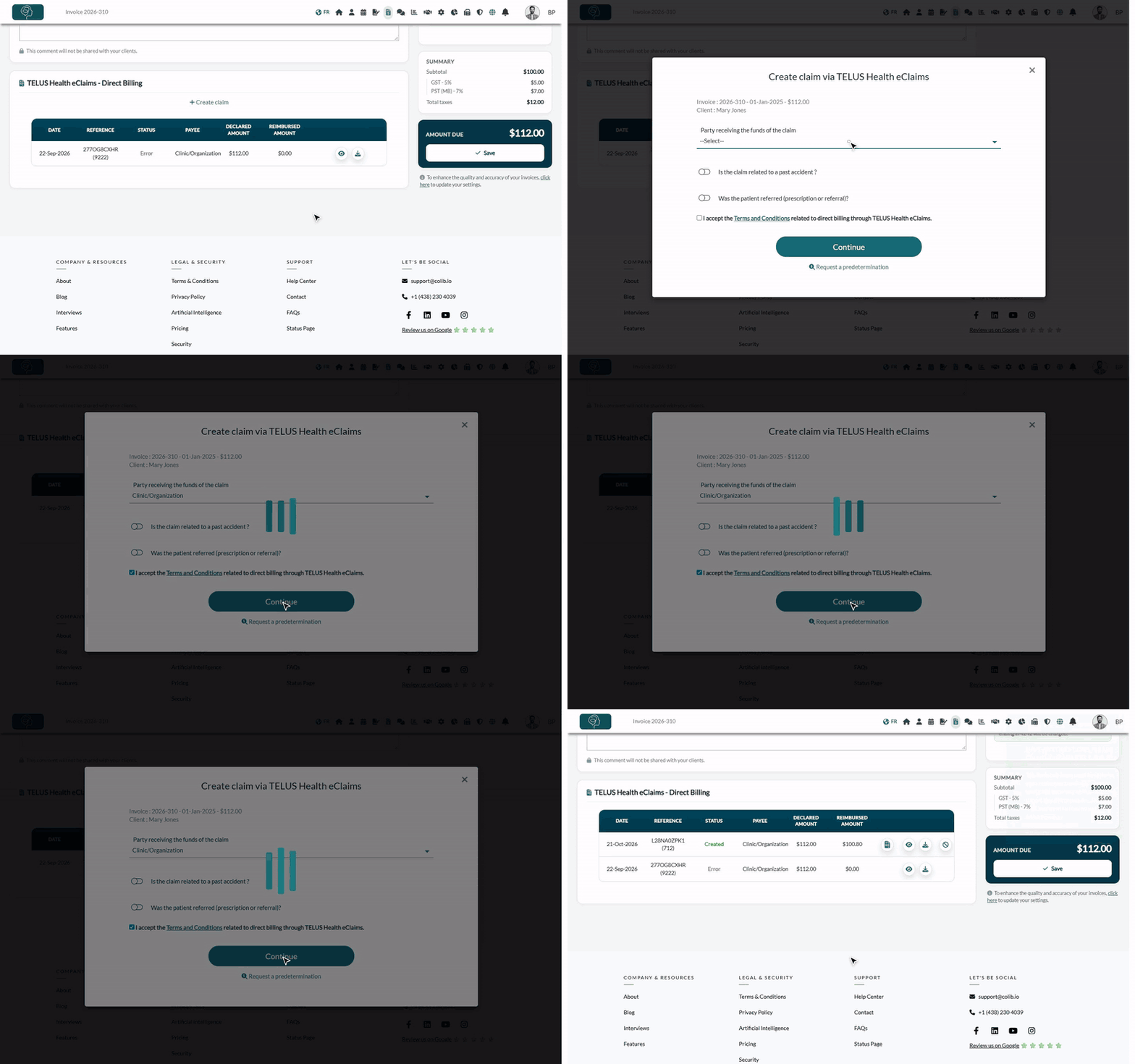
- Find the TELUS Health eClaims - Direct Billing card and click + Create claim.
Colib first checks the invoice, the client and the practitioner. If something is missing, the window lists what to fix under Please fix the following items to create a claim for this invoice :. Fix each item, then click Create claim again: please see the article titled "How to fix the errors when submitting a TELUS Health eClaims claim".
2Fill in the claim
The window Create claim via TELUS Health eClaims shows the invoice and the client. Fill in:
| Field | What to enter |
|---|---|
| Party receiving the funds of the claim | Who the insurer pays: Clinic/Organization (or Servicing Provider for an individual provider), or Insured Member if the insurer reimburses the client. |
| Is the claim related to a past accident ? | Turn it on if the care follows an accident, then choose the Type of accident (motor vehicle, school, sporting, workplace or other) and enter the Accident Date (YYYY-MM-DD). |
| Was the patient referred (prescription or referral)? | Turn it on if a doctor, an ophthalmologist or an optometrist referred the client, then enter the referrer's first name, last name and type. |
| Predetermination to link to this claim | Shown only if a predetermination was requested from this invoice: please see the article titled "How to request a predetermination and turn it into a claim". |
| Terms and Conditions | Read the TELUS provider agreement (link Terms and Conditions), then check the box. |
Click Continue. The claim is sent to the insurer through TELUS.
3Read the insurer's answer
The answer is shown right away, and the claim is added to the list of the TELUS card with its status:
| Answer | Status in Colib | What to do |
|---|---|---|
| The claim has been processed by the insurer (with or without adjustments) | Created | Read the amount in Reimbursed amount and the explanation of benefits (PDF). Give the PDF to the client. |
| The claim has been processed but refused by the insurer | Refused by the insurer | Read the reason in the message and in the PDF. The client pays the invoice. |
| Received and pending a manual review | Pending (under review by the insurer) | Do not submit it again. The insurer sends the result directly, outside Colib: please see the article titled "What to do with a pending, refused or failed TELUS Health eClaims claim". |
| The insurer cannot process this claim electronically | Error | Submit the claim manually on the TELUS platform. |
When the insurer states who it paid, the message ends with Payment made to : followed by the payee.
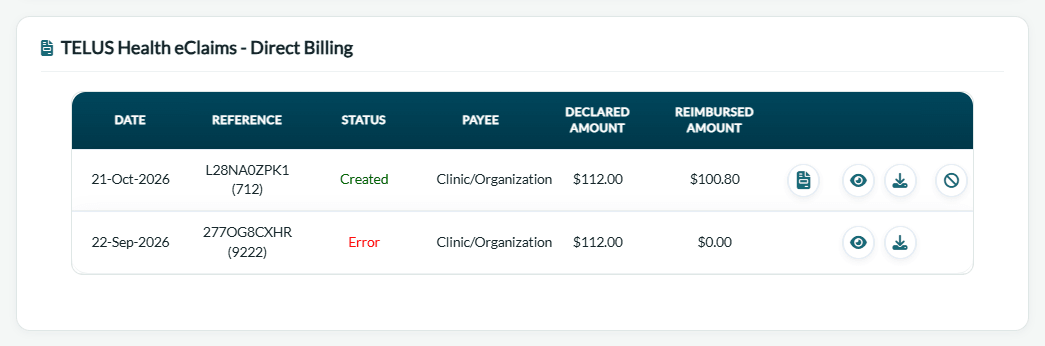
Give the insurer's document to the client: TELUS requires that the explanation of benefits be printed or given to the client. Open it with the eye icon (View PDF) or download it (Download PDF) from the list of the TELUS card.
4Record the reimbursement on the invoice
When the insurer pays the clinic (Clinic/Organization), click Add claim to invoice in the claim's row. The reimbursed amount is recorded as a partial payment: the invoice becomes partially paid, shows Covered by followed by the insurer, and the client pays the balance. Remove claim from invoice undoes it. For the other payees, please see the article titled "How to record the insurer's payment on the invoice".
Good to know
- One claim at a time — an invoice can have only one active claim (Created, Refused by the insurer or Pending). After an error or a cancellation, you can submit a new one.
- 31 lines — a claim cannot contain more than 31 lines (appointments and products). Split larger invoices.
- Deadlines — most insurers accept claims up to 31 days after the date of service; some accept fewer or more days. Past the deadline, submit the claim manually on the TELUS platform.
- Language — the claim is sent in the language of the invoice. The insurer's notes and PDF come back in that language when the insurer supports it.
- Mistake? — a claim can be cancelled electronically on the day it was submitted only: please see the article titled "How to cancel a TELUS Health eClaims claim".
Related articles
- Please see the article titled "How to set up TELUS Health eClaims for practitioners, clients, appointment types and products".
- Please see the article titled "How to fix the errors when submitting a TELUS Health eClaims claim".
- Please see the article titled "How to record the insurer's payment on the invoice".
- Please see the article titled "What to do with a pending, refused or failed TELUS Health eClaims claim".
- Please see the article titled "How to cancel a TELUS Health eClaims claim".
- Please see the article titled "How to request a predetermination and turn it into a claim".
- Please see the article titled "How to follow your claims in the Insurance claims dashboard".
Still have a question?
Write to us at support@colib.io, we will be happy to help.
Was this article helpful?
That’s Great!
Thank you for your feedback
Sorry! We couldn't be helpful
Thank you for your feedback
Feedback sent
We appreciate your effort and will try to fix the article