Who is this article for?
The insurer has answered your claim. Depending on who receives the funds, you record the insurer's payment on the invoice and the client pays the balance, or the client pays the whole invoice and is reimbursed by their insurer. This article explains each case.
| Party receiving the funds (chosen in the claim) | Who pays what |
|---|---|
| Clinic/Organization | The insurer pays the clinic the reimbursed amount. Record it on the invoice (below): the client pays the balance. |
| Servicing Provider (individual provider) | The insurer pays the practitioner. When you receive the payment, record it on the invoice as usual; the client pays the balance. |
| Insured Member | The insurer reimburses the client. The client pays you the whole invoice. |
1Record the insurer's payment (Clinic/Organization)
- Open the invoice and find the claim in the list of the TELUS Health eClaims - Direct Billing card. Its status must be Created.
- Click Add claim to invoice in the claim's row.
- The reimbursed amount is recorded as a partial payment: the invoice becomes partially paid, shows Covered by followed by the insurer, with a link to the explanation of benefits, and its PDF is updated.
- Collect the balance from the client as usual (card, cash, Interac, etc.).
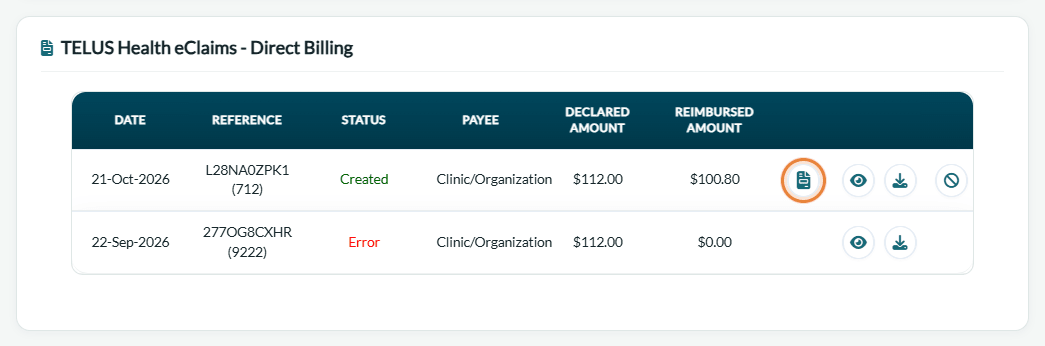
To undo it, click Remove claim from invoice: the invoice goes back to not paid.
When is it refused? Add claim to invoice is refused if the invoice is already Paid, or if a partial payment was already added to it. It is not offered for a claim refused by the insurer, pending or in error.
2Give the explanation of benefits to the client
Whoever is paid, give the client the insurer's document: open it with View PDF or download it with Download PDF in the claim's row. TELUS requires that it be printed or given to the client.
Good to know
- Cancellation — if the claim is cancelled the same day, the payment added to the invoice is removed automatically: please see the article titled "How to cancel a TELUS Health eClaims claim".
- Follow-up — the Total reimbursed of the Insurance claims dashboard adds up what the insurers covered: please see the article titled "How to follow your claims in the Insurance claims dashboard".
Related articles
- Please see the article titled "How to submit a claim through TELUS Health eClaims".
- Please see the article titled "What to do with a pending, refused or failed TELUS Health eClaims claim".
- Please see the article titled "How to follow your claims in the Insurance claims dashboard".
Still have a question?
Write to us at support@colib.io, we will be happy to help.
Was this article helpful?
That’s Great!
Thank you for your feedback
Sorry! We couldn't be helpful
Thank you for your feedback
Feedback sent
We appreciate your effort and will try to fix the article