Who is this article for?
You submitted a claim by mistake, or the care or the decision changed after you submitted it. TELUS Health eClaims lets you cancel the claim electronically, but only on the day it was submitted.
Same day only: a claim can be cancelled electronically only on the day it was submitted. After that day, the cancel icon is no longer shown: contact the insurer directly.
1Cancel the claim
- Open the invoice and find the claim in the list of the TELUS Health eClaims - Direct Billing card.
- Click the cancel icon (Cancel claim) in the claim's row.
- Choose the Reason for cancelling the claim: Entered in error (the claim was recorded incorrectly) or Altered decision (the services or the decision changed before the claim took effect).
- Click Cancel the claim.
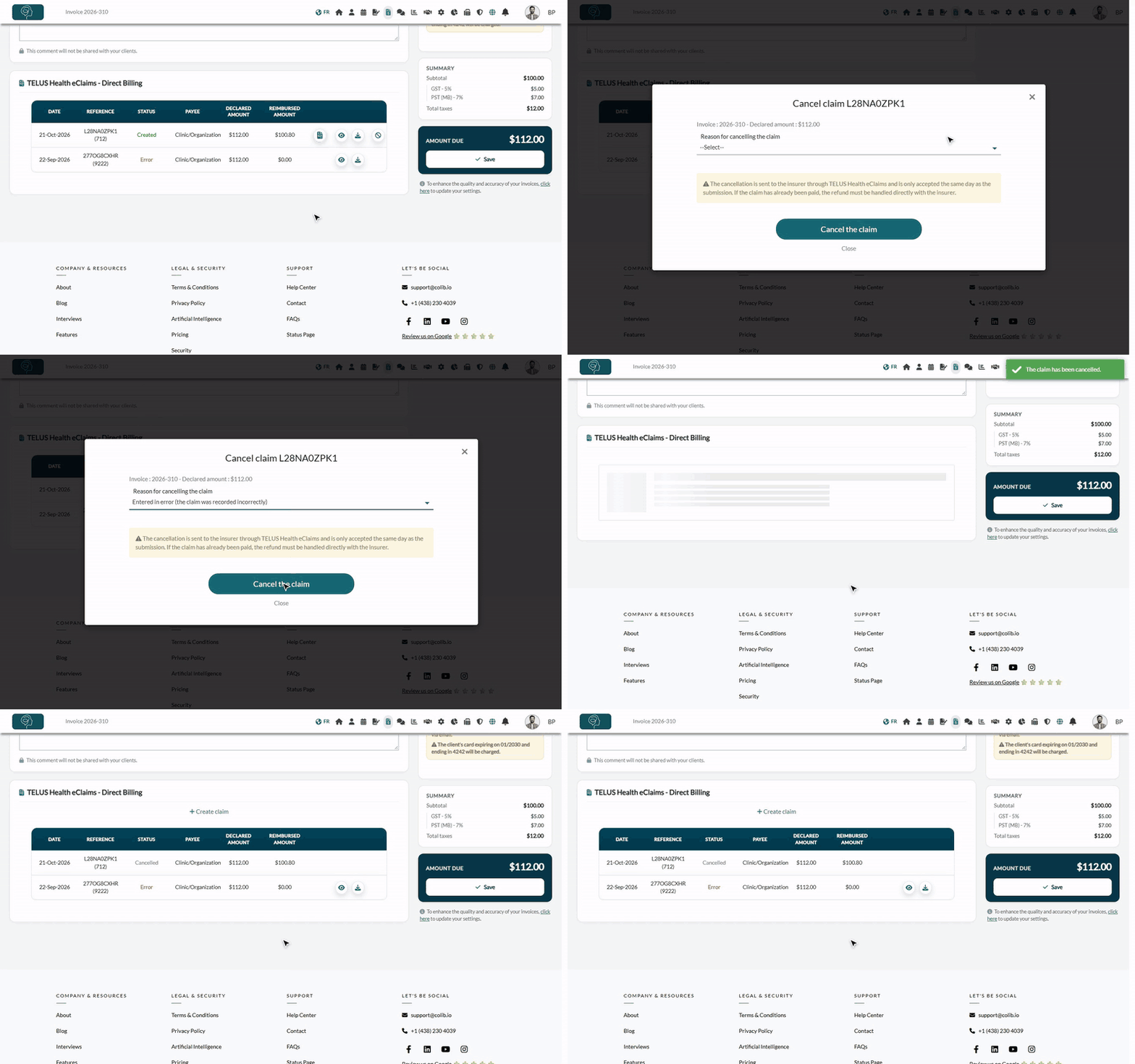
If the insurer accepts, the message The claim has been cancelled. confirms it. The status becomes Cancelled, and the insurer's PDF is no longer offered. If the reimbursement had been added to the invoice, it is removed and the invoice goes back to not paid.
If the insurer refuses, the message The claim could not be cancelled for the following reason : gives the insurer's reason, and the claim does not change. Some insurers do not accept electronic cancellations: contact the insurer.
2Which claims can be cancelled?
| Claim | Can it be cancelled in Colib? |
|---|---|
| Created, Refused by the insurer or Pending, submitted today | Yes. |
| Submitted on a previous day | No: contact the insurer directly. |
| Error or already Cancelled | No: there is nothing to cancel. You can submit a new claim. |
| Predetermination | No: a predetermination is only an estimate, nothing is paid. |
Do not change the invoice first: the amount of the invoice must be the same as when the claim was submitted. If you changed it, Colib refuses the cancellation and shows the previous amount: put the invoice back as it was, cancel the claim, then correct the invoice.
Good to know
- Already paid? — if the insurer has already paid, the refund is handled directly with the insurer.
- The client — Colib sends nothing to the client when a claim is cancelled. Tell the client if needed.
- Submit again — once the claim is cancelled, you can correct the invoice and submit a new claim: please see the article titled "How to submit a claim through TELUS Health eClaims".
- Until midnight — the day of the submission ends at midnight, in the time zone of your clinic.
Related articles
- Please see the article titled "How to submit a claim through TELUS Health eClaims".
- Please see the article titled "How to follow your claims in the Insurance claims dashboard".
Still have a question?
Write to us at support@colib.io, we will be happy to help.
Was this article helpful?
That’s Great!
Thank you for your feedback
Sorry! We couldn't be helpful
Thank you for your feedback
Feedback sent
We appreciate your effort and will try to fix the article