Who is this article for?
TELUS requires the written consent of each client before their claims are sent through TELUS Health eClaims. Colib asks for this consent in the client record and keeps a trace of it. This article explains how to collect it, for new clients and for the clients whose insurance was already entered.
1Have the client sign the TELUS form
- Open the client record (www.colib.io/clients) and expand the TELUS Health eClaims section.
- Click Download the consent form. The TELUS form opens in the language of your screen.
- Have the client read and sign the form, on paper or electronically, and keep the signed form (for example in the client's Documents tab).
2Record the consent in Colib
- In the same section, turn on The client consents to the transmission of their claims through TELUS Health eClaims.
- Check the insurance information (insurance company, member ID, contract, relationship), then save the record.
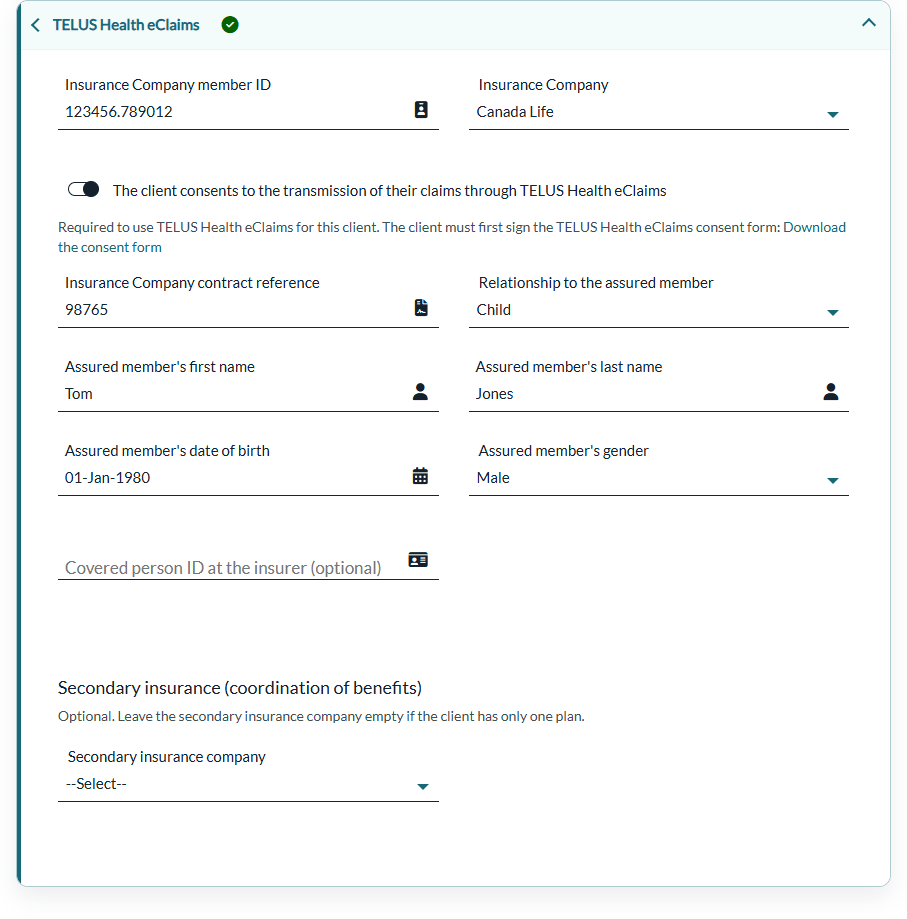
When you save, Colib records the consent in the client's consents, with the type Consent to direct billing through TELUS Health eClaims, the date, the user and the link to the TELUS form. You find it with the other consents of the client: How to record and track client consents in Colib.
Required with a member ID: a client record that contains an Insurance Company member ID cannot be saved without the consent. Colib shows The client's consent to TELUS Health eClaims is required when an Insurance Company member ID is entered. and reopens the section.
3Clients whose insurance was entered before
The consent is never assumed. For a client whose insurance was entered before the consent existed in Colib, the switch is off: have the client sign the TELUS form, turn on the consent and save the record before sending their next claim.
Good to know
- Withdrawal — if the client withdraws their consent, turn off the switch and remove the member ID, then save. Their next claims can no longer be sent through TELUS Health eClaims: give them their receipt instead.
- History — each time the consent is turned on and saved, a new entry is recorded, so you keep the full history.
Related articles
- Please see the article titled "How to set up TELUS Health eClaims for practitioners, clients, appointment types and products".
- Please see the article titled "How to set up dependants and secondary insurance for TELUS Health eClaims".
- Please see the article titled "How to submit a claim through TELUS Health eClaims".
Still have a question?
Write to us at support@colib.io, we will be happy to help.
Was this article helpful?
That’s Great!
Thank you for your feedback
Sorry! We couldn't be helpful
Thank you for your feedback
Feedback sent
We appreciate your effort and will try to fix the article