Each clinic in your account can have its own online booking page, with its own address, so clients book at the right location.
Setting up a clinic's booking page
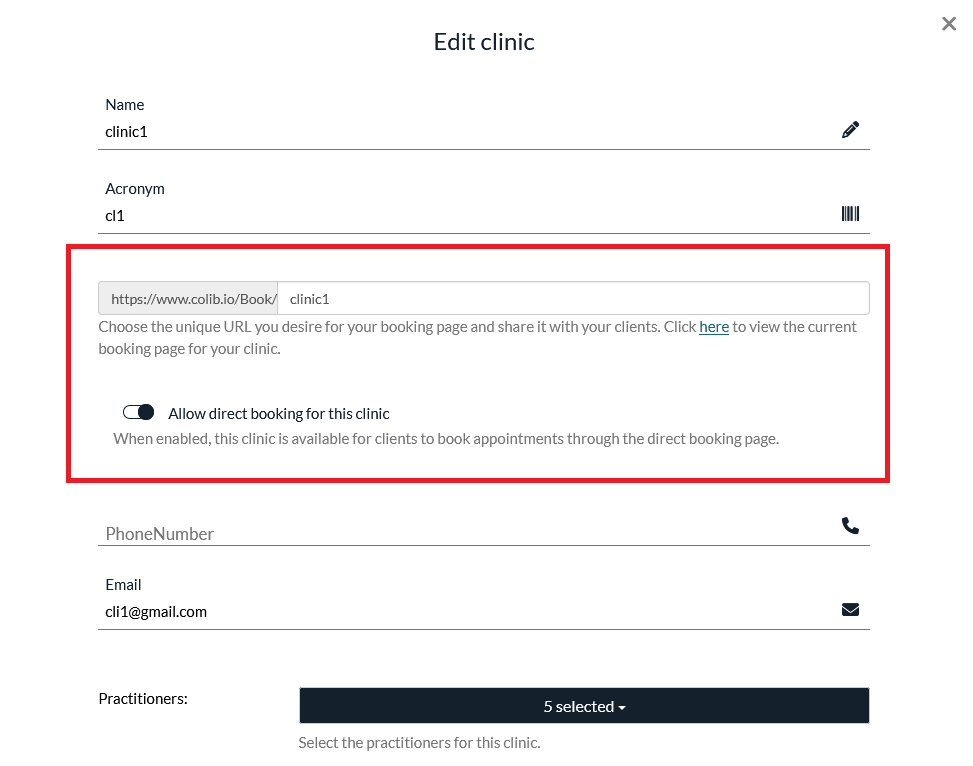
1. Go to Settings > Multi-clinics (https://www.colib.io/Settings?show=clinics) and edit the clinic (pencil icon). The booking options appear once the clinic has been created.
2. Choose the clinic's unique URL: your page will be available at https://www.colib.io/Book/XXXXX. A link lets you preview the page at any time.
3. Enable direct booking if you want clients to book this location by themselves. If it is disabled, the clinic is not
offered for direct online booking.
4. Save.
What clients see on a clinic page
The page only offers what belongs to that location: the appointment types linked to the clinic and the practitioners assigned to it. This prevents a client from booking a service or a practitioner at the wrong address.
Good to know
- Share each clinic's link in the right context: the location's Google Business profile, its email signature, its
section of your website.
- If a service or practitioner is missing from a clinic's page, check that the appointment type is linked to that clinic and that the practitioner is assigned to it.
Was this article helpful?
That’s Great!
Thank you for your feedback
Sorry! We couldn't be helpful
Thank you for your feedback
Feedback sent
We appreciate your effort and will try to fix the article