Who is this article for?
This article is for practice administrators who want to track the number of appointments of the current billing period, for example to estimate the next payment of the Starter plan or the licenses of their practitioners.
Before you start: only users with the Administrator role see the Plan section (handshake icon in the top bar).
1Open the Plan tab
- Go to www.colib.io/planandpayments. You can also click the Plan icon (handshake) in the top bar.
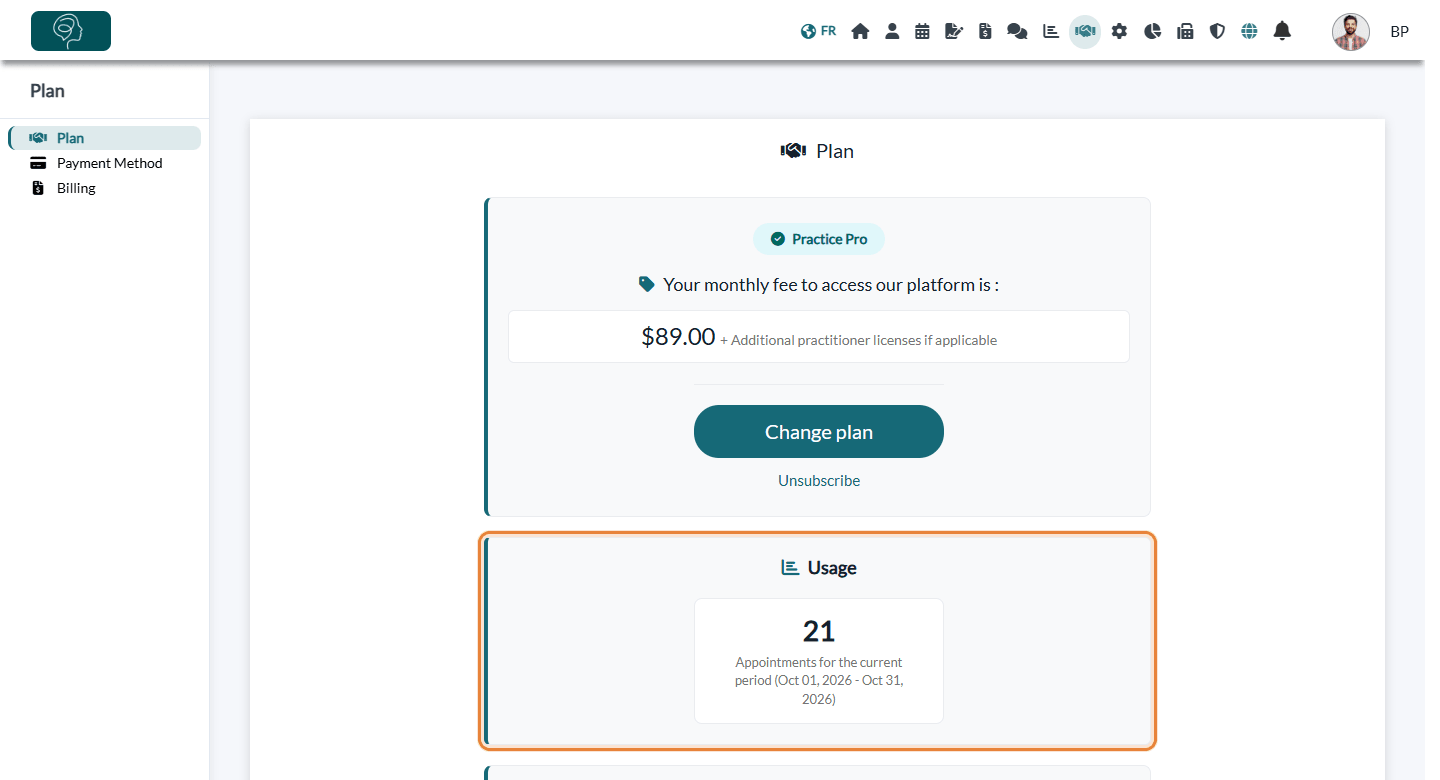
- The Plan tab opens. It shows your plan, then the Usage section.
2Read the Usage section
The Usage section shows:
- Appointments for the current period — the number of appointments of your practice for the current billing period, with the start and end dates of the period in brackets.
- Note(s) generated via AI for the current period — only if AI-powered notes were generated during the period.
- Credit or Balance — only if your account has a credit (for example a referral credit) or an amount due.
What is counted
The counter includes the appointments of all the practitioners of your practice whose date falls within the current period. What matters is the date of the appointment, not the day it was created: an appointment already booked for later in the period is counted, and the number can go down if an appointment is cancelled.
Counted:
- scheduled, confirmed, completed and rescheduled appointments;
- appointments marked as no-show;
- in-person and online appointments, including group appointments.
Not counted:
- cancelled and late-cancelled appointments;
- deleted appointments;
- Busy and Other events, and tasks;
- appointments dated during your free trial.
The billing period
- The period starts on your billing date and lasts one month. Its dates are shown next to the counter.
- The counter goes back to zero at the start of each new period.
- On the Starter plan, the appointments of the period are billed $3 each on the next billing date. See How does payment for Colib plans work?
Good to know
- During your free trial — the Usage section is not displayed: the appointments of the trial are never counted or billed.
- No plan after the trial — the Usage section shows Forms completed this month and Appointments for the current month. Please see the article titled "What happens when my free trial ends?"
- Completed forms — once you have a plan, the number of completed forms is no longer shown in the Plan tab. On the Starter plan, a message appears in Forms > Results when you get close to the monthly limit. Please see the article titled "How are forms counted in my plan (monthly limit)?"
- Busy and Other events — use them freely to block time: see Do events categorized as Busy or Other count toward the appointment limit?
- AI-powered notes — see How billing works for AI-powered notes.
- File storage — the same tab shows your File storage usage. Please see the article titled "How much does file storage cost and where do I see my usage?"
Still have a question?
Write to us at support@colib.io, we will be happy to help.
Was this article helpful?
That’s Great!
Thank you for your feedback
Sorry! We couldn't be helpful
Thank you for your feedback
Feedback sent
We appreciate your effort and will try to fix the article