Who is this article for?
This article is for practice owners and administrators who use the AI scribe, the artificial intelligence (AI) note generator of Colib. It explains how the notes it generates are billed, with two options: per-note billing with a monthly cap, or prepaid packages of notes that cost less.
What is billed: each note drafted by the AI after an online session or from the audio recording of an in-person session. The AI rewriting assistant of the note editor and voice dictation are not counted as AI notes. To turn the feature on and learn how it works, see How does the Artificial Intelligence note generation work?
1Per-note billing, capped every month
When your practice has no active package (see option 2), the AI notes generated during the month are added to your next monthly Colib invoice. For each practitioner of the practice, you pay the lower of these two amounts:
- CA$1.00 per generated note, or
- CA$49.00 per practitioner for unlimited use during the month.
In other words, the monthly charge of a practitioner is always the lower amount between per-note billing and the unlimited monthly rate.
| Notes generated by a practitioner in the month | Price |
|---|---|
| 12 notes | CA$12.00 |
| 45 notes | CA$45.00 |
| 97 notes | CA$49.00 (unlimited rate) |
On your monthly invoice, the AI notes appear on one line per practitioner. You find your invoices and receipts in Plan & Payments > Billing (www.colib.io/planandpayments?show=billing).
2Prepaid packages of AI notes
If you use AI notes regularly, you save money by buying a package of notes in advance. Each package gives you a number of AI notes for a fixed price. The packages currently available are:
| Package | Price | Discount compared with CA$1.00 per note |
|---|---|---|
| 100 AI notes | CA$85 | 15% off |
| 200 AI notes | CA$165 | 17.5% off |
| 400 AI notes | CA$315 | 21.25% off |
Packages are independent from your Colib subscription plan: they are a one-time purchase, not a subscription. Applicable taxes are added to the price.
3Buy a package
- Make sure a payment card is entered for your practice in Plan & Payments > Payment Method (www.colib.io/planandpayments?show=details). Without a card, the message You need to enter your payment information to purchase AI note generation packages. is shown instead of the purchase button.
- Go to Settings > Notes (www.colib.io/settings?show=notes).
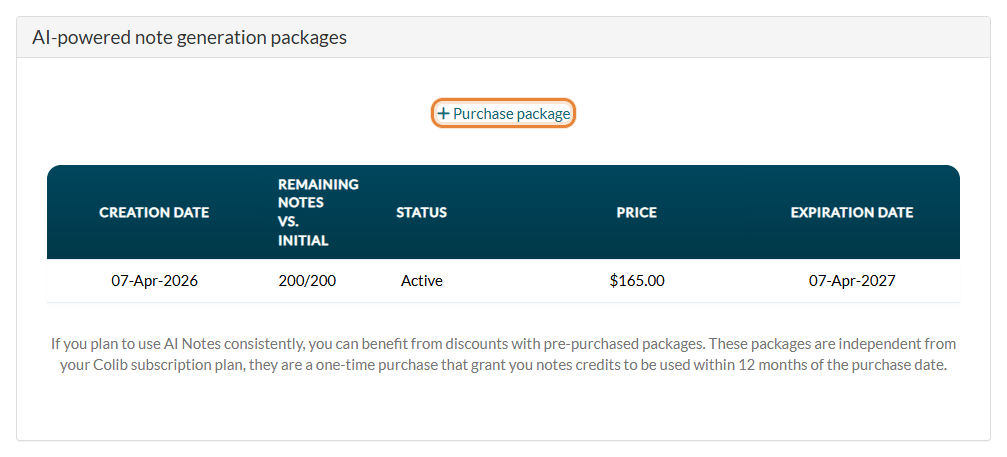
- Scroll down to the AI-powered note generation packages section and click Purchase package. A window opens.
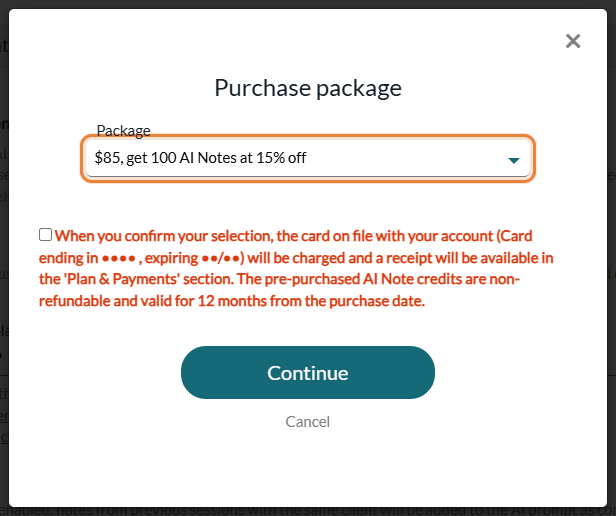
- Select your package in the list.
- Check the box to accept the terms: the card on file is charged, the receipt will be available in Plan & Payments, and the prepaid notes are non-refundable and valid for 12 months.
- Click Continue. Your card is charged immediately.
Once the payment is confirmed, the package is activated and listed in the AI-powered note generation packages section, with its purchase date, the Remaining notes vs. initial, its status (Active, Used or Expired), its price and its Expiration Date. The receipt is available in Plan & Payments > Billing (www.colib.io/planandpayments?show=billing).
4How package notes are used
- Automatically — every time an AI note is generated in your practice, one note is taken from your package. You have nothing to do.
- Shared by the whole practice — the notes of a package can be used by any practitioner of the practice.
- Oldest package first — if you have several active packages, the notes of the oldest one are used first.
- Valid 12 months — purchased notes expire one year after the purchase date. Notes not used by then are lost.
- When the package is empty or expired — the next AI notes are billed on your next monthly invoice with per-note billing (option 1), until you buy a new package.
Good to know
- Free trial — AI notes generated during the free trial of your practice are not billed and are not taken from a package.
- Who can generate AI notes — you can limit AI notes to some practitioners or appointment types, or turn them off. For more details, please see the article titled "How to turn artificial intelligence features on or off for your clinic".
- Clients who refuse AI — no AI note is generated for them, so nothing is billed. See How to disable AI-generated notes for a specific client?
- Better notes — template, session history, tone and level of detail: see How to personalize AI-generated notes in Colib?
- In-person sessions — see How to generate AI-powered session notes without using Colib's telehealth system.
Still have a question?
Write to us at support@colib.io, we will be happy to help.
Was this article helpful?
That’s Great!
Thank you for your feedback
Sorry! We couldn't be helpful
Thank you for your feedback
Feedback sent
We appreciate your effort and will try to fix the article