Who is this article for?
When Colib drafts a session note with artificial intelligence (AI), it can also read the notes of the client's previous sessions. With this context, the AI follows the progress of the client and writes more relevant and personalized notes: goals already set, exercises given last time, changes since the previous session.
This article explains how to turn this option on or off, which notes are used and how to check it on a generated note.
Before you start: AI notes must be turned on for your practice. To learn how AI note generation works, see How does the Artificial Intelligence note generation work? You need access to the practice settings.
1Turn on the session history
- Go to Settings > Notes (www.colib.io/settings?show=notes).
- In the Content and writing style of AI-generated notes section, turn on Include previous session history in AI note generation.
- Click Save at the bottom of the section.
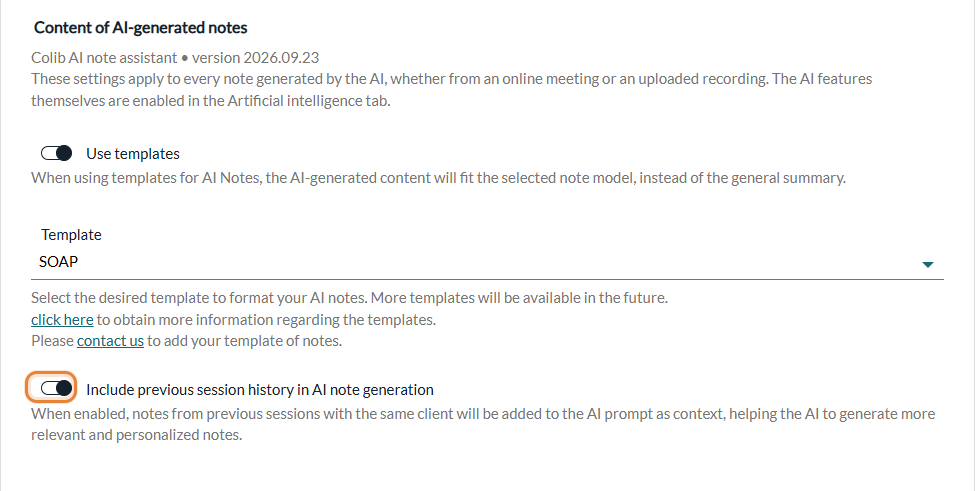
The setting applies to the whole practice, from the next AI note generated, whether the session took place online with Colib's telehealth system or in person (see How to generate AI-powered session notes without using Colib's telehealth system). The option is on by default. To turn it off, follow the same steps and turn the switch off.
2Which notes are used
- The 10 most recent notes of the client in your practice, written before the start of the session. Older notes are not used.
- All the notes of the client record — whatever their type, whether they were written by hand or generated by the AI, signed or not, and whoever the practitioner of the practice who wrote them.
- Not the notes of the same appointment — a note already linked to the session being drafted is not used.
- Group sessions — the previous notes of the clients who take part in the session are used.
- Very long notes — if the previous notes are too long to be sent with the session, the oldest ones are left out first.
3Check it on a generated note
Open an AI-generated note in the client record and expand About this AI result. Under Information sent to the model, the line Notes from previous sessions shows how many previous notes were used, for example Notes from previous sessions (4). The line does not appear when no previous note was used.
Notes imported from another software
If you moved your client records to Colib from another software (see How can I migrate clients, their appointments, their documents and their notes from my old system to Colib?):
- Notes imported as text are notes like the others: they count among the 10 previous notes.
- Notes imported as PDF files are documents attached to the record: their content is not read by the AI.
Good to know
- What else is sent — besides the session and the previous notes, only the first names of the client and of the practitioner are sent to the model. No other information from the client record is sent.
- Clients who refuse AI — no AI note is generated for them. See How to disable AI-generated notes for a specific client?
- Other settings — template, point of view, tone, format and level of detail: see How to personalize AI-generated notes in Colib? and How can I select a different template for each type of appointment?
- Always review — the AI note is a draft: read it, correct it and sign it.
Still have a question?
Write to us at support@colib.io, we will be happy to help.
Was this article helpful?
That’s Great!
Thank you for your feedback
Sorry! We couldn't be helpful
Thank you for your feedback
Feedback sent
We appreciate your effort and will try to fix the article