Who is this article for?
Colib lets you create a public profile page to showcase your practice: your presentation, your areas of expertise, your team, your opening hours and location, a gallery of images and videos, a contact form and a button to book online. This page is fully customizable. Here is an example of a public page: www.colib.io/Practice/your-own-brand.
This article explains how to turn on the page, fill in each section, check the result and share it.
Before you start: the page is configured in Settings > Public Page (www.colib.io/settings?show=webpage), by an administrator of the practice. Your logo, address, opening hours, social media links, background image and theme color come from Settings > General. For more details, please see the article titled "How to set up your practice information (logo, contact details, address, opening hours)".
1Turn on the page and choose its address
- Go to www.colib.io/settings?show=webpage. You can also click the Settings icon (gear) in the top bar, then Public Page in the Admin menu on the left.
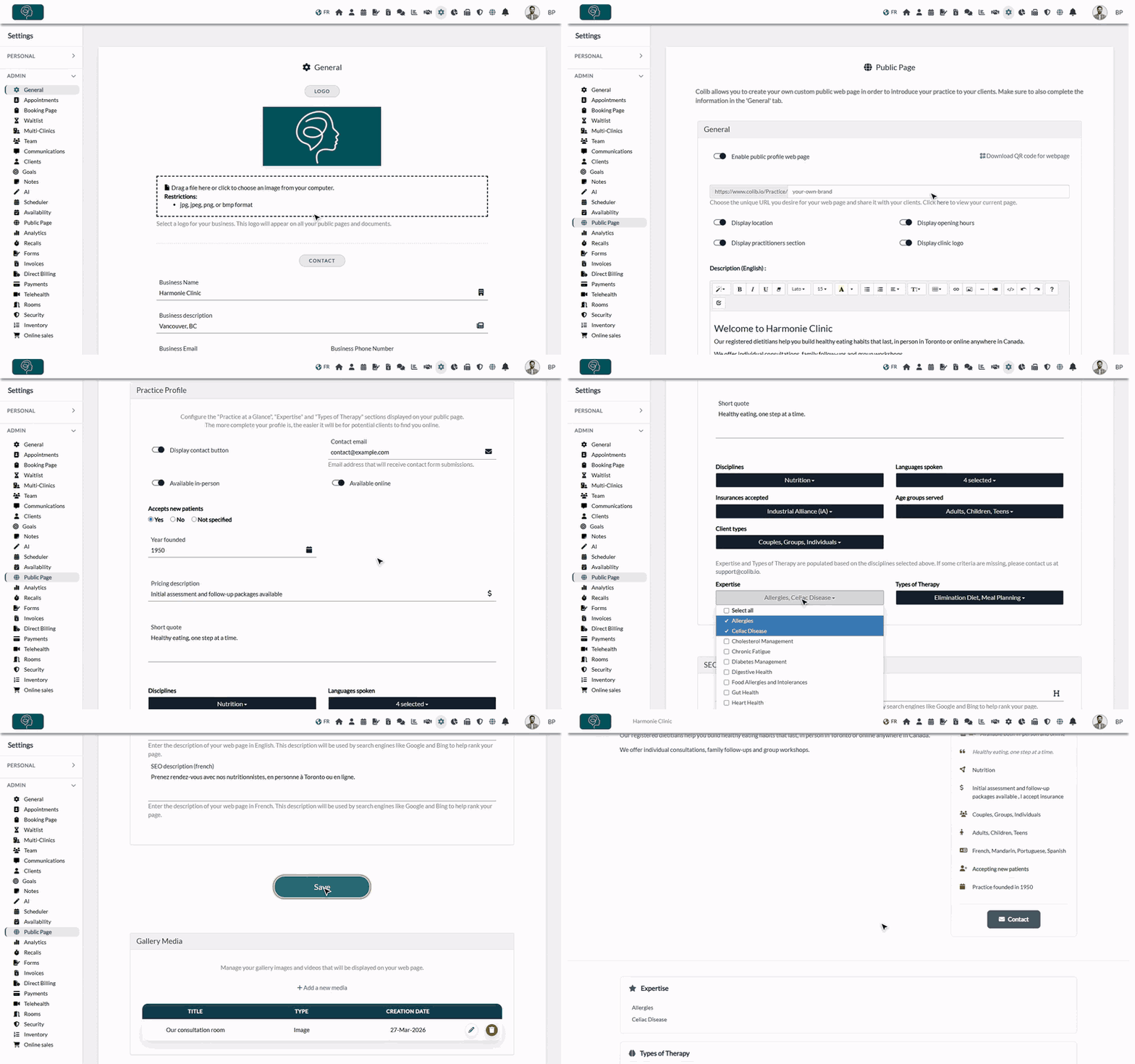
- In the General section, turn on Enable public profile web page. This switch is saved as soon as you click it: your page is online right away, and the other options of the section appear.
- Check the end of the address of your page, after https://www.colib.io/Practice/. For example, enter the name of your practice: when you save, Colib turns it into a valid web address (lowercase, without accents or special characters).
- Choose what to show with the switches Display location, Display opening hours, Display practitioners section and Display clinic logo.
| Option | What is shown on the page |
|---|---|
| Display location | A Location section with your address and a map. It only appears if your address is entered and your address policy shows the full address (Settings > General). |
| Display opening hours | An Opening Hours section with the opening hours of your practice, day by day. |
| Display practitioners section | An Our Practitioners section with every team member marked as practitioner: photo, qualification and description, as entered in Settings > Team. |
| Display clinic logo | Your logo at the top of the page, above the name of your practice. |
Important: the end of the address is shared with your booking page (www.colib.io/Booking/...). If you change it, the address of your booking page changes too: update the links you have already shared (website, social media, email signature). If the address you choose is already used by another practice, Colib adds a number at the end.
2Write your presentation
- In Description (English), write the presentation of your practice for your English-speaking visitors.
- In Description (French), write it for your French-speaking visitors.
- Use the toolbar of the editor to format the text (font, size, color, lists, tables) and to add links, images and videos.
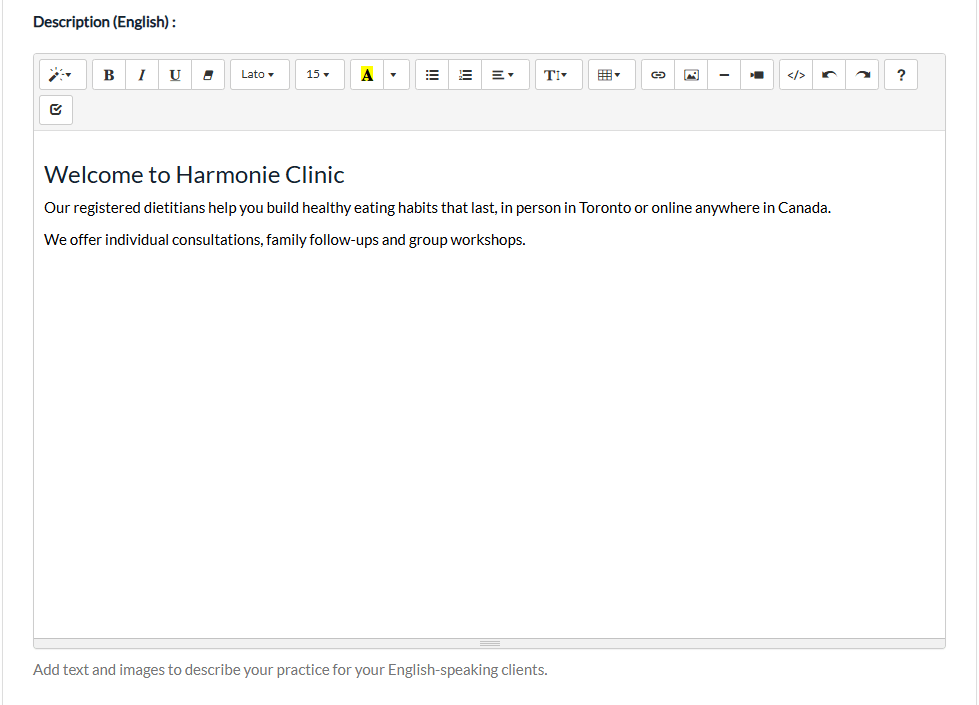
Visitors see the description in the language of the page. If one of the two descriptions is empty, the other one is shown instead.
3Fill in your practice profile
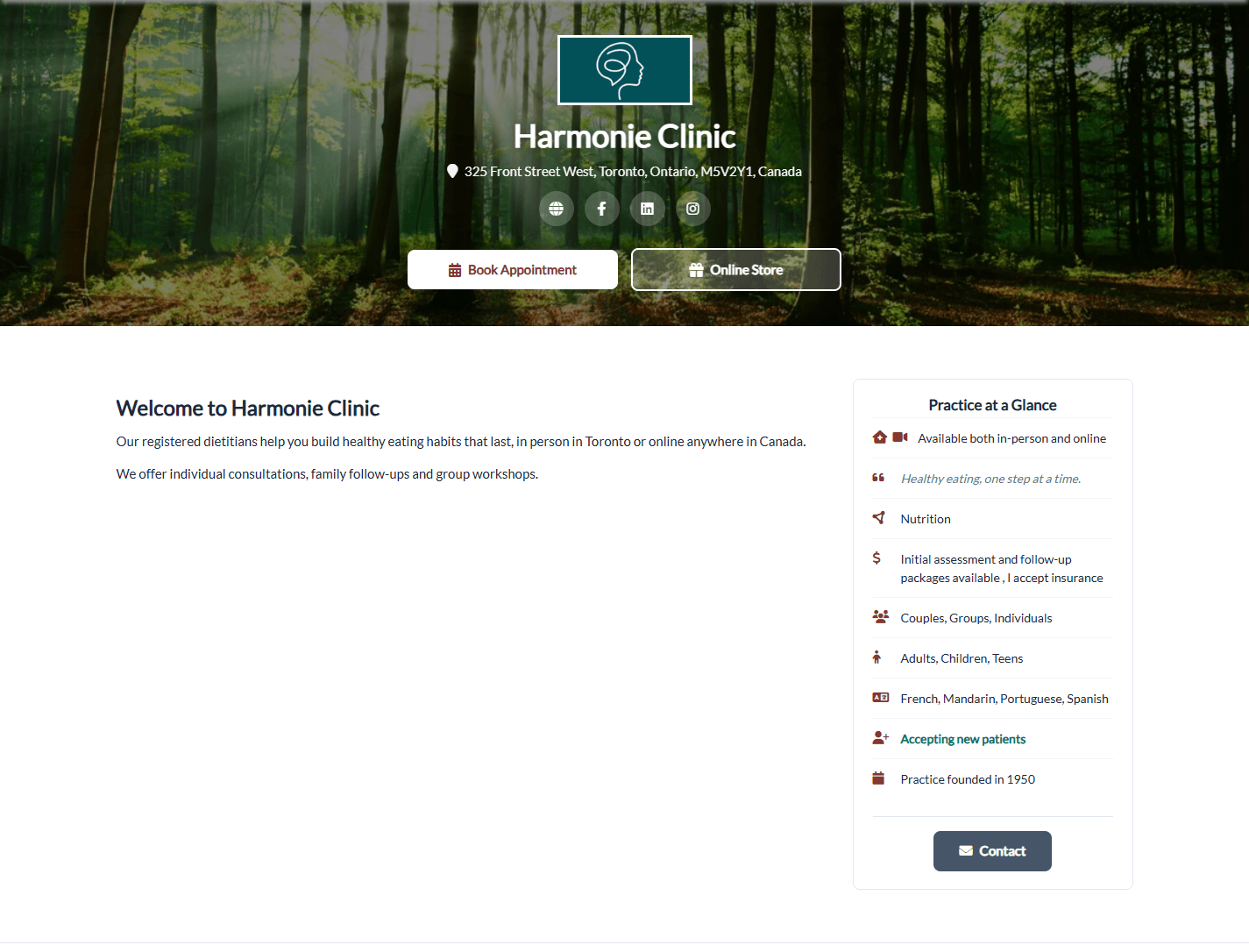
The Practice Profile section builds the Practice at a Glance box displayed next to your description, and the Expertise and Types of Therapy sections. The more complete your profile is, the easier it is for potential clients to find you online.
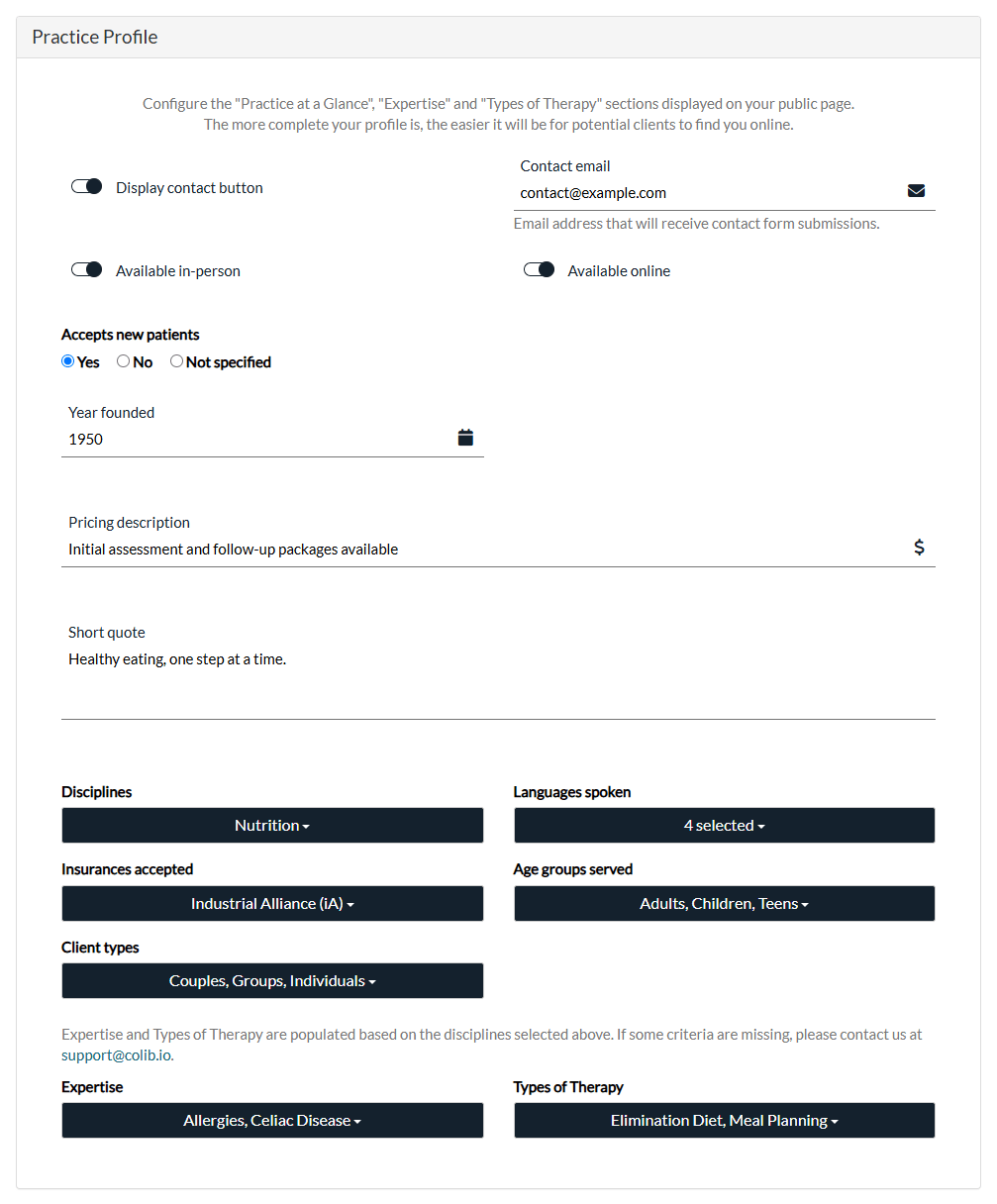
- Display contact button and Contact email — adds a Contact button that opens a contact form protected by a CAPTCHA. Visitors enter their name, email address, phone number (optional), a subject and their message; the message is sent to the Contact email. The button is only shown when a valid contact email is entered.
- Available in-person and Available online — tells visitors how you see your clients.
- Accepts new patients — Yes, No or Not specified (nothing is shown).
- Year founded, Pricing description and Short quote — free fields, shown as you write them.
- Disciplines, Languages spoken, Insurances accepted, Age groups served and Client types — tick the options that apply in each list.
- Expertise and Types of Therapy — these lists appear once you have chosen at least one discipline, and only offer the options related to your disciplines.
An option is missing from Expertise or Types of Therapy? These lists are closed: you cannot add your own items. Check that all your disciplines are selected, then write to us at support@colib.io with the criteria you need. In the meantime, you can mention them in your Description, your Short quote or your Pricing description. Adding your areas of expertise and the types of therapy you offer also helps search engines find your page.
4Optimize for search engines and save
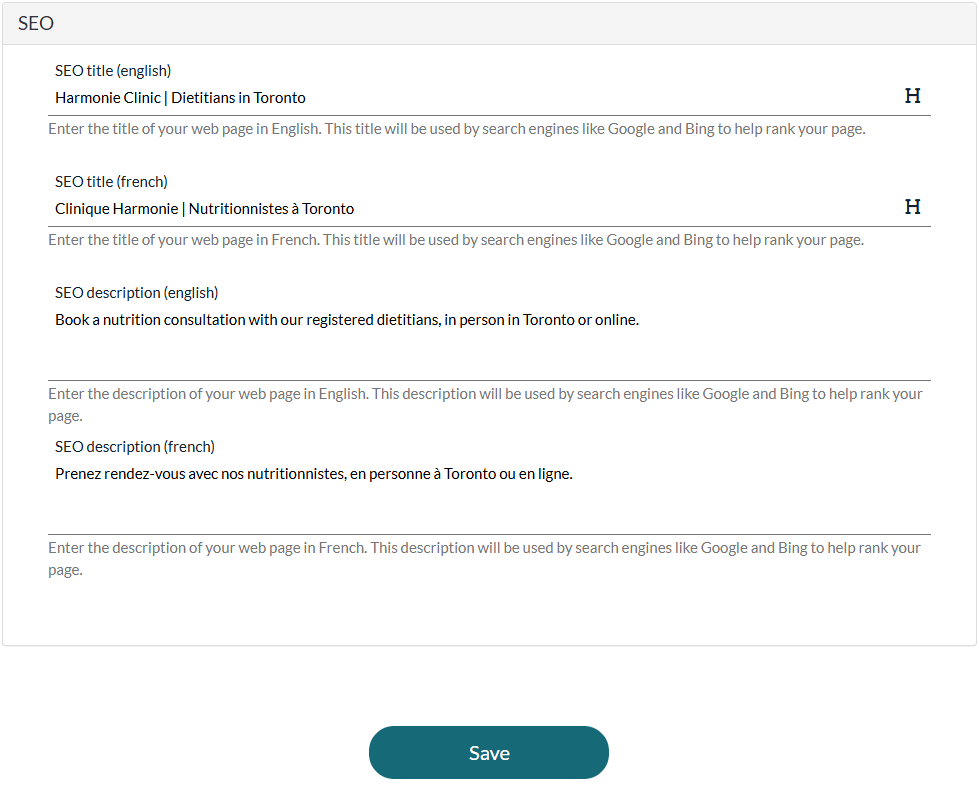
- In the SEO section, enter the title and the description of your page, in English and in French. Search engines like Google and Bing use them in their results.
- These fields are optional: if you leave them empty, Colib generates them automatically from your practice information (name of the practice, disciplines or business description). If only one language is filled in, it is used for both.
- Click Save. The message The modifications have been successfully saved. confirms the changes.
Search engines only index your page if Allow Colib to list and promote my practice is turned on in Settings > General (www.colib.io/settings?show=general). When it is off, the page stays reachable by its link but search engines are asked not to list it.
5Add images and videos to the gallery
- Scroll down to the Gallery Media section, below the Save button. It is only shown when the public page is turned on.
- Click Add a new media.
- Enter a Title, then drag your file onto the Media File area or click it to choose a file. Accepted formats: images in JPG, JPEG, PNG or BMP, videos in MP4 (50 MB maximum).
- Click Save in the window. The media is added to the list and to the Gallery section of your page.
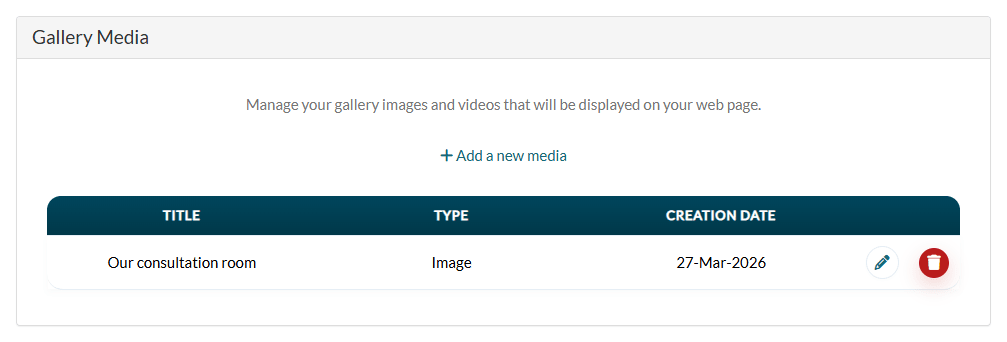
Use the pencil icon to change a media and the trash icon to remove it from the gallery.
6Check your page and share it
- Back in the General section, click the here link under the address of the page: your public page opens in a new tab.
- Share the address of the page on your website, your social media or in your email signature.
- To print it on a business card or a poster, click Download QR code for webpage.
Can I preview the page before publishing it? There is no draft mode. The page only exists while Enable public profile web page is turned on: when it is off, its address shows a "not found" page. To check your changes, save them, then click the here link. Your booking page works the same way.
What else appears on the page
- Header — the name of your practice, your address, your phone number and email (according to their visibility on public pages), your website and social media links, on your background image. These elements, and your theme color, are set in Settings > General (www.colib.io/settings?show=general).
- Booking button — Book Appointment opens your booking page when clients book online, or Request Appointment opens your appointment request form, depending on your booking settings. See What options does Colib offer for my clients to book appointments?
- Online Store — a second button opens your online store when online sales are turned on and your payment account is connected.
Good to know
- Turning the page off — turn off Enable public profile web page: the page is taken offline immediately. Your description, profile and gallery are kept for later.
- Practitioner profiles — the photo, qualification and description of each practitioner are edited in Settings > Team (www.colib.io/settings?show=team), with the pencil icon of the practitioner.
- Branding — to replace the Colib brand with yours and choose your color, please see the article titled "How do I brand my pages (white label, theme color)?"
- Your own website — you can also embed your booking page in your website: see How can I embed my booking page on my website?
Still have a question?
Write to us at support@colib.io, we will be happy to help.
Was this article helpful?
That’s Great!
Thank you for your feedback
Sorry! We couldn't be helpful
Thank you for your feedback
Feedback sent
We appreciate your effort and will try to fix the article